
Ai, Business Growth, Digital Marketing, Digital Transformation, MiKi Infosys
How to Create Business Automation Using the Latest AI Tools — A Practical Guide for Business Owners
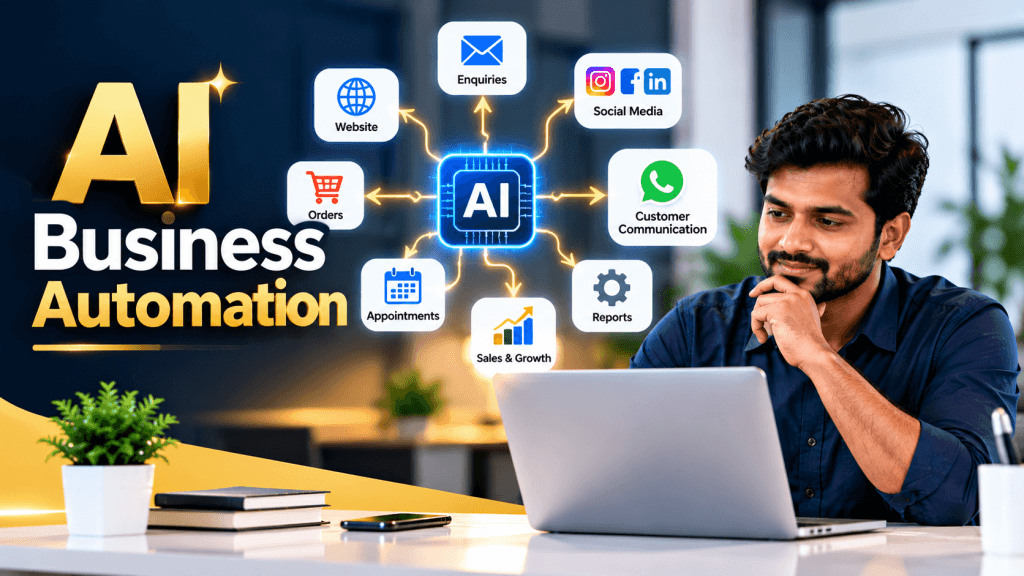
Oct
Stop repeating tasks. Start building a smarter business.
Imagine this: A customer enquires about your service through your website. The system records the enquiry, sends an acknowledgement, identifies what the customer needs, notifies your sales team, schedules a follow-up and updates your customer database — with minimal manual work.
This is the power of AI-powered business automation.
In 2026, business automation is no longer limited to large companies with dedicated IT teams. Small businesses, shops, agencies, consultants and service providers can also connect their everyday tools and automate repetitive tasks using artificial intelligence (AI).
In this guide, MiKi Infosys explains how business automation works, which AI tools you can explore, how to build your first workflow and how automation can help your business grow.
1. What Is AI-Powered Business Automation?
Business automation means using technology to complete repetitive business activities with less manual effort.
Traditional automation follows predefined rules. For example, when a customer fills out a form, the system automatically sends an email.
AI-powered automation adds intelligence to the process. It can help understand customer messages, classify enquiries, summarise information, draft responses and route requests according to their content.
Modern AI agents can also use connected tools to complete multiple steps in a workflow, subject to their permissions and configured safeguards. https://openai.com/academy/workspace-agents/
Example:
A customer sends this message:
“I need a website for my textile shop. Please share the price.”
An AI-powered workflow could:
- Identify the enquiry as a website development request.
- Extract the customer’s business type and requirements.
- Save the enquiry in a CRM or spreadsheet.
- Draft a relevant response using your approved pricing information.
- Notify your sales team to follow up.
- Track whether the enquiry becomes a customer.
The result? Less repetitive administration and a more organised customer follow-up process.
2. Which Business Tasks Can You Automate Using AI?
You don’t need to automate everything at once. Start with tasks that consume time every day.
A. Lead Generation and Follow-Up
When someone submits an enquiry through your website, landing page or advertising campaign, automation can:
- Record the customer’s details.
- Categorise the enquiry by service or product.
- Send an acknowledgement.
- Assign the enquiry to the appropriate employee.
- Schedule a follow-up reminder.
- Update the lead’s status.
Business benefit: Fewer missed enquiries and a more consistent sales process.
B. WhatsApp and Customer Communication
With an appropriately configured WhatsApp Business integration, businesses can automate approved notifications, frequently asked questions and parts of the customer support process.
Possible workflows include:
- Sending order confirmations.
- Sharing appointment reminders.
- Answering common questions using approved business information.
- Routing complicated enquiries to a human employee.
- Notifying customers when an order status changes.
Use the official WhatsApp Business Platform or an authorised provider where appropriate. Follow applicable messaging consent, template and platform rules. Avoid unsolicited bulk messages.
Business benefit: Faster responses and less manual communication.
C. Social Media Content and Marketing
AI can help your marketing team prepare content more efficiently.
A workflow could:
- Take a topic from a content calendar.
- Generate a draft caption.
- Suggest relevant keywords and hashtags.
- Create alternative versions for different platforms.
- Send the content to a manager for approval.
- Schedule the approved post using a supported publishing tool.
Business benefit: A more consistent content schedule without manually starting every post from scratch.
Important: AI-generated content should be checked for accuracy, brand consistency and originality before publishing.
D. Website and E-Commerce Automation
For a WordPress or WooCommerce business, automation can help with:
- New order notifications.
- Low-stock alerts.
- Customer support ticket creation.
- Order-status communication.
- Product description drafts.
- Abandoned-cart follow-up where consent and platform rules permit.
- Daily or weekly sales summaries.
Business benefit: Smoother operations and fewer repetitive administrative tasks.
E. Accounts and Business Reporting
Automation can collect information from supported systems and prepare reports such as:
- Daily sales summaries.
- Outstanding payment reminders.
- Monthly marketing expenditure reports.
- Lead conversion summaries.
- Inventory alerts.
- Employee task updates.
AI can summarise the data, but financial records, tax decisions and payment actions should remain subject to appropriate verification and approval.
Business benefit: Better visibility into business performance and more time for decision-making.
3. Latest AI Automation Tools Worth Exploring in 2026
The right tool depends on your budget, technical skills, existing software and workflow requirements. These are useful starting points, not a universal ranking.
1. n8n — Flexible Workflow Automation
n8n connects different applications and supports AI-powered workflows. It is useful when a business needs greater control over integrations, branching logic and custom processes.
Suitable for:
- Connecting websites, databases and business applications.
- Building AI-assisted lead management workflows.
- Creating custom internal assistants.
- Designing workflows with human approval checkpoints.
Explore: https://n8n.io/
2. Zapier — Connecting Business Apps
Zapier connects applications through trigger-and-action workflows and supports AI-powered steps for tasks such as summarising, classifying and drafting information.
Suitable for:
- Connecting forms to spreadsheets and CRMs.
- Sending automatic notifications.
- Routing leads between applications.
- Creating workflows without extensive coding.
Explore: https://zapier.com/
3. OpenAI and ChatGPT — AI Assistance and Agents
AI models can help interpret information, draft content, summarise documents and support workflows. Eligible ChatGPT business workspaces also offer workspace agents for repeatable tasks across connected tools, depending on availability and configuration.
Suitable for:
- Preparing customer response drafts.
- Summarising reports.
- Analysing incoming enquiries.
- Supporting internal knowledge and administrative workflows.
Explore: https://openai.com/ and https://chatgpt.com/
Remember: An AI chatbot, an AI model and an automation platform are different things. A complete business automation system may use all three, connected to your approved business applications.
4. How to Create Your First AI Business Automation
Let’s build a practical example: automatic website lead management.
Suppose you run a digital marketing agency, consultancy, retail business or service company and receive enquiries through a website form.
Step 1: Choose One Repetitive Task
Start with a clear problem.
For example:
“Every day, I manually copy website enquiries into a spreadsheet and remind my team to follow up.”
Your goal is to record each enquiry, acknowledge receipt and make follow-up easier.
Step 2: Select Your Automation Tools
A basic setup could include:
- Input: WordPress contact form or another lead form.
- Workflow: n8n or Zapier.
- AI: An approved AI model for classifying and summarising enquiries.
- Storage: A CRM or Google Sheets.
- Notification: Email or an authorised messaging integration.
Check that each service supports the required integration and that its pricing, permissions and data-handling terms suit your business.
Step 3: Design the Workflow
A typical workflow looks like this:
Customer submits a form → System validates the details → AI classifies the enquiry → Lead is saved → Customer receives acknowledgement → Sales team is notified → Follow-up is tracked
Not every step requires AI. Use ordinary rules for predictable actions and AI where understanding language or interpreting information adds value.
Step 4: Write Clear AI Instructions
For example, your AI classification step could use the following instruction:
“Review the customer enquiry. Identify the requested service, summarise the requirement in one sentence, and classify the lead as high, medium or low priority using the business criteria provided. Do not invent customer details, prices or commitments. If information is unclear, mark it for human review. Return the result in the required structured format.”
Provide the AI with clear categories and approved business information. Avoid asking it to guess missing details.
Step 5: Add Business Rules
Define what happens next.
For example:
- If the enquiry is about website development, assign it to the website sales team.
- If it is about social media marketing, assign it to the marketing team.
- If the customer’s requirements are unclear, request clarification.
- If the system encounters an error, log it and notify the administrator.
These rules make the workflow more predictable.
Step 6: Test Before Going Live
Test the workflow using sample enquiries, incomplete details, duplicate submissions and unusual messages.
Check that:
- Information is saved correctly.
- Customers receive appropriate messages.
- Leads are assigned to the correct person.
- Duplicate records are handled.
- Errors are logged.
- Sensitive actions require approval where necessary.
Start with a small number of enquiries before rolling the system out across your business.
Step 7: Measure the Results
After launching the workflow, compare its performance with your previous manual process.
Track:
- Time spent on administration.
- Average response time.
- Percentage of enquiries followed up.
- Errors and duplicate records.
- Lead-to-customer conversion rate.
- Total monthly automation cost.
This helps you determine whether the automation is creating real business value.
5. A Practical AI Automation Example for a Small Business
Consider a business that receives enquiries from its website and social media campaigns.
The following example is illustrative, not a guaranteed result.
| Activity | Manual process | Automated process |
|---|---|---|
| Record an enquiry | Employee enters details | Workflow records details |
| Categorise the lead | Employee reads the message | AI suggests a category |
| Acknowledge receipt | Employee sends a reply | Approved automatic response |
| Assign follow-up | Employee contacts the team | Workflow notifies the owner |
| Review performance | Manual spreadsheet review | Scheduled summary report |
The goal is not necessarily to remove employees from the process. It is to let them spend less time on repetitive administration and more time on customer relationships, sales and decision-making.
6. How Business Automation Helps Your Business Grow
Saves Time
Automated workflows can handle repetitive data entry, notifications, report preparation and routine administrative tasks.
Reduces Missed Enquiries
When lead capture and follow-up reminders are connected, fewer enquiries depend entirely on someone remembering to act.
Improves Customer Experience
Customers can receive timely acknowledgements, consistent information and better routing to the right team.
Supports Business Growth
A well-designed workflow can process more routine activity without requiring the same increase in manual administration. However, complex customer needs and exceptions still require people.
Improves Decision-Making
Scheduled reports and consolidated data help business owners identify trends, monitor costs and make more informed decisions.
Helps Small Teams Work More Efficiently
Small businesses can use automation to organise processes that might otherwise require additional administrative effort.
The key is to automate a proven business process, not simply to adopt AI because it is trending.
7. How Much Does AI Business Automation Cost?
There is no single price for business automation. The cost depends on the tools, number of workflows, usage, integrations, support and level of customisation.
Common cost components include:
- Automation platform subscription or hosting.
- AI model usage.
- Third-party application subscriptions.
- Setup and integration.
- Maintenance, monitoring and support.
A simple workflow that connects a form to a spreadsheet may require very little custom development. A system involving WhatsApp, a CRM, e-commerce, payment processing and several AI steps will generally require more planning and testing.
Before choosing a solution, calculate the total cost and compare it with the time saved, errors avoided and business outcomes achieved. Check current tool pricing directly with each provider.
8. Important Safety Rules for AI Automation
Automation can create problems when it has too much access or operates without suitable checks.
Follow these practices:
- Protect customer information: Collect only the information required and use approved services.
- Limit permissions: Give each integration access only to the systems and actions it needs.
- Keep human approval: Review important customer communications, refunds, payments, account changes and other high-impact actions before execution.
- Monitor errors: Keep logs and establish a process for failed workflows.
- Verify AI outputs: AI can misunderstand messages or generate incorrect information.
- Maintain a manual fallback: Employees should be able to handle important tasks when automation fails.
Tools such as n8n support human-review checkpoints for selected AI actions, allowing workflows to pause until a person approves or rejects an action. See the n8n documentation on human review.
For most businesses, the best approach is to automate routine, low-risk actions first and introduce more advanced AI capabilities gradually.
9. Your 30-Day Business Automation Plan
You do not need to transform your entire business in one month. Start small and improve systematically.
Week 1 — Identify the problem
List repetitive tasks, estimate the time they consume and identify where errors or missed opportunities occur.
Week 2 — Design one workflow
Choose a process such as lead capture, enquiry acknowledgement or daily reporting. Select the tools and define the business rules.
Week 3 — Build and test
Configure the integrations, add AI only where it is useful, test edge cases and set up monitoring and approvals.
Week 4 — Measure and improve
Review the results, calculate the costs and fix problems. Expand to another workflow only after the first one is reliable.
Conclusion: Build a Smarter Business With AI Automation
AI business automation is not just about saving a few minutes. It is about building reliable processes that help your business respond faster, organise information, reduce repetitive work and serve customers more consistently.
Start with one clear problem. Choose the right tools. Build a simple workflow. Test it carefully. Measure the results.
Once your first automation works reliably, you can gradually connect more of your business operations.
MiKi Infosys can help your business move from manual work to smarter digital processes through website development, digital marketing, AI-powered workflow planning and business automation solutions.
MiKi Infosys
Your Business. Digitally Better.
Website: https://www.mikiinfosys.xyz
AI Automation, Business Automation, AI Tools for Business, Workflow Automation, Small Business Growth, n8n, Zapier, ChatGPT
